

How to Find Minecraft Fireflies
Pubblicato il da

Condividi:

Condividi su X

Condividi su Facebook

Condividi su Threads

Condividi su Bluesky

Copia negli Appunti

Condividi via email
As of Minecraft snapshot 25w05a, fireflies are illuminating the night and keeping mobs at bay, but not every biome will have their light show on display. So, today, we answer how to find Minecraft fireflies and firefly bush blocks in game.
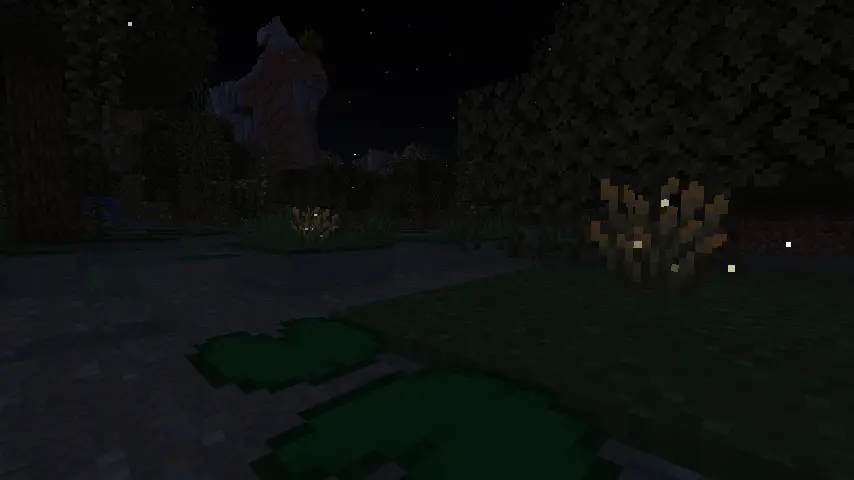 Minecraft fireflies are not mobs like bees or frogs but instead glowing particles that float around a new block called a firefly bush. During the day, these firefly bush blocks can be distinguished from regular bush blocks by their darker green base, yellowish leaf tips, and glowing (firefly) pixels on their leaves. At night, however, fireflies fly around the block’s surroundings in a beautiful mob-like display.
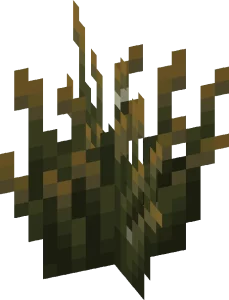 Players searching for Minecraft Fireflies will need to locate and gather firefly bush blocks, which generate in swamp biomes and along rivers as of Minecraft snapshot 25w05a (Minecraft 1.21.5.) Thankfully, neither swamp biomes nor rivers are rare, and rivers can typically be found by adventuring out into the world within a few minutes’ time.
Once located, Firefly bush blocks can be gathered by hand, placed anywhere, and duplicated with bone meal. They also produce a light level of two, which prevents mobs from spawning in a very small radius around them.
Players searching for Minecraft Fireflies will need to locate and gather firefly bush blocks, which generate in swamp biomes and along rivers as of Minecraft snapshot 25w05a (Minecraft 1.21.5.) Thankfully, neither swamp biomes nor rivers are rare, and rivers can typically be found by adventuring out into the world within a few minutes’ time.
Once located, Firefly bush blocks can be gathered by hand, placed anywhere, and duplicated with bone meal. They also produce a light level of two, which prevents mobs from spawning in a very small radius around them.
 Should bad luck or an unfortunate spawn be encountered, there is always the option of using the “/locate” command. This nifty tool provides the exact coordinates of the nearest structure or biome, and by clicking them, teleports the player there.
Some would consider this cheating, but in Minecraft, that is for you to decide. The full locate biome command for swamp biomes is as follows:
Should bad luck or an unfortunate spawn be encountered, there is always the option of using the “/locate” command. This nifty tool provides the exact coordinates of the nearest structure or biome, and by clicking them, teleports the player there.
Some would consider this cheating, but in Minecraft, that is for you to decide. The full locate biome command for swamp biomes is as follows:
Minecraft Fireflies: Mob Vs Particle
Minecraft fireflies are not mobs like bees or frogs but instead glowing particles that float around a new block called a firefly bush. During the day, these firefly bush blocks can be distinguished from regular bush blocks by their darker green base, yellowish leaf tips, and glowing (firefly) pixels on their leaves. At night, however, fireflies fly around the block’s surroundings in a beautiful mob-like display.
How to Find Minecraft Fireflies
Players searching for Minecraft Fireflies will need to locate and gather firefly bush blocks, which generate in swamp biomes and along rivers as of Minecraft snapshot 25w05a (Minecraft 1.21.5.) Thankfully, neither swamp biomes nor rivers are rare, and rivers can typically be found by adventuring out into the world within a few minutes’ time.
Once located, Firefly bush blocks can be gathered by hand, placed anywhere, and duplicated with bone meal. They also produce a light level of two, which prevents mobs from spawning in a very small radius around them.
How to Find Swamp Biomes with Commands
- /locate biome minecraft:swamp
Crea il tuo server
Minecraft
Minecraft
Scegli un piano, seleziona un gioco e gioca con i tuoi amici!
Iscriviti alla nostra Newsletter
Iscriviti per ricevere gli ultimi aggiornamenti sul mondo del gaming!

Unisciti al nostro Discord
Entra a far parte della nostra community con oltre 20.000 membri appassionati come te!
Come valuteresti questo blog?
Condividi la tua opinione e aiutaci a migliorare sempre di più i nostri blog!
Non mi è piaciuto
Neutrale
Mi è piaciuto

Hai bisogno di un server di gioco?
Noleggia un server di gioco dove tu e i tuoi amici potrete giocare in privato con bassa latenza e impostazioni personalizzate. Scegli tra 110+ giochi, invita persone da tutto il mondo, goditi le partite private o costruisci la tua community online con le tue regole.

Blog Pertinenti







SCOPRI LE ULTIME NOVITÀ!
Iscriviti alla nostra newsletter per ricevere aggiornamenti sui nostri giochi ospitati, novità aziendali e offerte esclusive. Rimani sempre aggiornato!













