
Factorio Display Panel Guide: How to Craft, Uses, & More
Pubblicato il da

Condividi:

Condividi su X

Condividi su Facebook

Condividi su Threads

Condividi su Bluesky

Copia negli Appunti

Condividi via email
Introduced in Update 2.0.7, the Display Panel in Factorio is a circuit network entity that displays various icons and texts. Doing so allows players to know which products are created and moved in a production line, especially within a mall. So, keep reading as we guide you on how to craft and use this new monitor.
 To craft the Factorio display panel, first unlock the Circuit Network technology, which requires 100x Automation Science Pack and 100x Logistic Science Pack. Doing so unlocks the crafting recipe for the Display Panel, which then requires 1x Electronic Circuit and 1x Iron Plate.
Note: The Logistic Science Pack must be unlocked before it's possible to unlock the Circuit Network technology.
Players can craft Display Panels through manual crafting. Alternatively, use Assembling Machines 1, 2, or 3 to make this entity.
To craft the Factorio display panel, first unlock the Circuit Network technology, which requires 100x Automation Science Pack and 100x Logistic Science Pack. Doing so unlocks the crafting recipe for the Display Panel, which then requires 1x Electronic Circuit and 1x Iron Plate.
Note: The Logistic Science Pack must be unlocked before it's possible to unlock the Circuit Network technology.
Players can craft Display Panels through manual crafting. Alternatively, use Assembling Machines 1, 2, or 3 to make this entity.
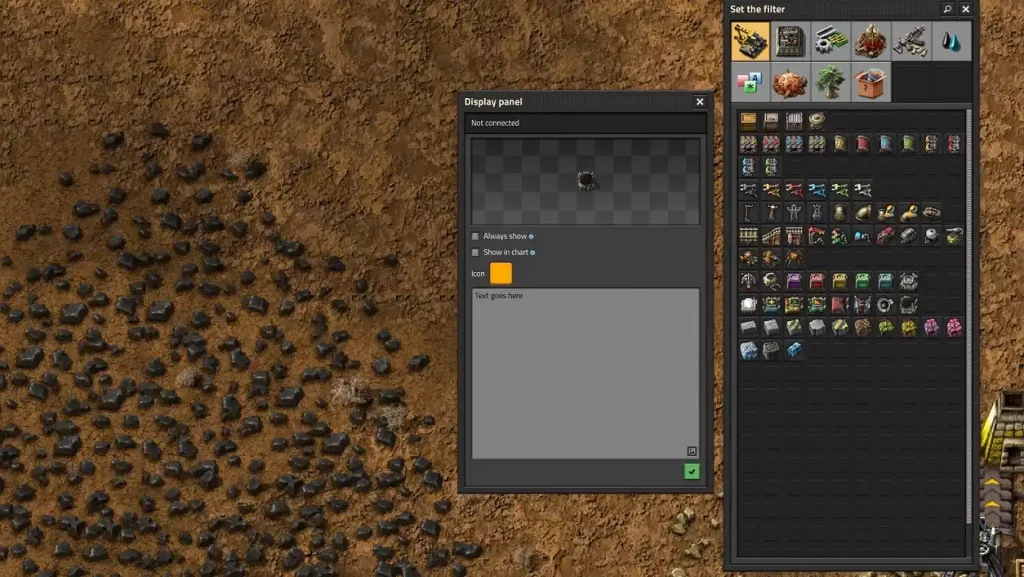 Opening the interface of the Display Panel in Factorio lets you choose which icon and text to show on the monitor. Connecting the Display Panel to an existing Circuit Network also allows the panel to show different images and messages depending on various conditions.
From afar, the Display Panel only shows the icon(s). Hovering your mouse over the entity shows the different lines of text recorded in it.
However, it’s not possible to show the quantity of items on the Display Panel as they’re passing through the network. Thankfully, one Reddit user created a blueprint that uses other entities to showcase numbers while using Display Panels. Additionally, this particular blueprint doesn’t require mods, albeit its components may require some farming and grinding.
Alternatively, some players can modify the functionality of the Display Panel in Factorio using mods. One notable mod comes from GitHub user henwessels. The mod in question is called “Larger Display Panels,” and it enlarges the in-game monitor to up to 6x6 tiles instead of the standard 1x1.
Opening the interface of the Display Panel in Factorio lets you choose which icon and text to show on the monitor. Connecting the Display Panel to an existing Circuit Network also allows the panel to show different images and messages depending on various conditions.
From afar, the Display Panel only shows the icon(s). Hovering your mouse over the entity shows the different lines of text recorded in it.
However, it’s not possible to show the quantity of items on the Display Panel as they’re passing through the network. Thankfully, one Reddit user created a blueprint that uses other entities to showcase numbers while using Display Panels. Additionally, this particular blueprint doesn’t require mods, albeit its components may require some farming and grinding.
Alternatively, some players can modify the functionality of the Display Panel in Factorio using mods. One notable mod comes from GitHub user henwessels. The mod in question is called “Larger Display Panels,” and it enlarges the in-game monitor to up to 6x6 tiles instead of the standard 1x1.
How to Craft the Display Panel in Factorio
To craft the Factorio display panel, first unlock the Circuit Network technology, which requires 100x Automation Science Pack and 100x Logistic Science Pack. Doing so unlocks the crafting recipe for the Display Panel, which then requires 1x Electronic Circuit and 1x Iron Plate.
Note: The Logistic Science Pack must be unlocked before it's possible to unlock the Circuit Network technology.
Players can craft Display Panels through manual crafting. Alternatively, use Assembling Machines 1, 2, or 3 to make this entity.
Using the Display Panel
Opening the interface of the Display Panel in Factorio lets you choose which icon and text to show on the monitor. Connecting the Display Panel to an existing Circuit Network also allows the panel to show different images and messages depending on various conditions.
From afar, the Display Panel only shows the icon(s). Hovering your mouse over the entity shows the different lines of text recorded in it.
However, it’s not possible to show the quantity of items on the Display Panel as they’re passing through the network. Thankfully, one Reddit user created a blueprint that uses other entities to showcase numbers while using Display Panels. Additionally, this particular blueprint doesn’t require mods, albeit its components may require some farming and grinding.
Alternatively, some players can modify the functionality of the Display Panel in Factorio using mods. One notable mod comes from GitHub user henwessels. The mod in question is called “Larger Display Panels,” and it enlarges the in-game monitor to up to 6x6 tiles instead of the standard 1x1.Crea il tuo server
Factorio
Factorio
Scegli un piano, seleziona un gioco e gioca con i tuoi amici!
Iscriviti alla nostra Newsletter
Iscriviti per ricevere gli ultimi aggiornamenti sul mondo del gaming!

Unisciti al nostro Discord
Entra a far parte della nostra community con oltre 20.000 membri appassionati come te!
Come valuteresti questo blog?
Condividi la tua opinione e aiutaci a migliorare sempre di più i nostri blog!
Non mi è piaciuto
Neutrale
Mi è piaciuto

Hai bisogno di un server di gioco?
Noleggia un server di gioco dove tu e i tuoi amici potrete giocare in privato con bassa latenza e impostazioni personalizzate. Scegli tra 110+ giochi, invita persone da tutto il mondo, goditi le partite private o costruisci la tua community online con le tue regole.

Blog Pertinenti







SCOPRI LE ULTIME NOVITÀ!
Iscriviti alla nostra newsletter per ricevere aggiornamenti sui nostri giochi ospitati, novità aziendali e offerte esclusive. Rimani sempre aggiornato!













