

7 Days to Die: How to Play the Experimental Branch
Pubblicato il da

Condividi:

Condividi su X

Condividi su Facebook

Condividi su Threads

Condividi su Bluesky

Copia negli Appunti

Condividi via email
Starting June 16, zombie apocalypse survivors can experience the 7 Days to Die 2.0: Storm’s Brewing Update, along with its new content, features, and improvements, by playing in the Experimental Branch. So, keep reading to learn how to access the Experimental Branch in 7 Days to Die, and enjoy Update 2.0 before everyone else!
 Note that the 7 Days to Die Experimental Branch is only available for PC players through Steam. The game’s console versions, particularly on PlayStation and Xbox, will generally receive the stable versions of each patch, including Update 2.0. Thankfully, the update's Stable version should be released on June 30, not too long after the Experimental Branch's version's launch date.
With that, here’s how to access the 7 Days to Die Experimental Branch and experience Update 2.0:
Note that the 7 Days to Die Experimental Branch is only available for PC players through Steam. The game’s console versions, particularly on PlayStation and Xbox, will generally receive the stable versions of each patch, including Update 2.0. Thankfully, the update's Stable version should be released on June 30, not too long after the Experimental Branch's version's launch date.
With that, here’s how to access the 7 Days to Die Experimental Branch and experience Update 2.0:
How to Play in the 7 Days to Die Experimental Branch
Note that the 7 Days to Die Experimental Branch is only available for PC players through Steam. The game’s console versions, particularly on PlayStation and Xbox, will generally receive the stable versions of each patch, including Update 2.0. Thankfully, the update's Stable version should be released on June 30, not too long after the Experimental Branch's version's launch date.
With that, here’s how to access the 7 Days to Die Experimental Branch and experience Update 2.0:
- 1. Log into your Steam account
- 2. Access your game Library and right-click on 7 Days to Die in the left sidebar
- 3. Select Properties in the context menu
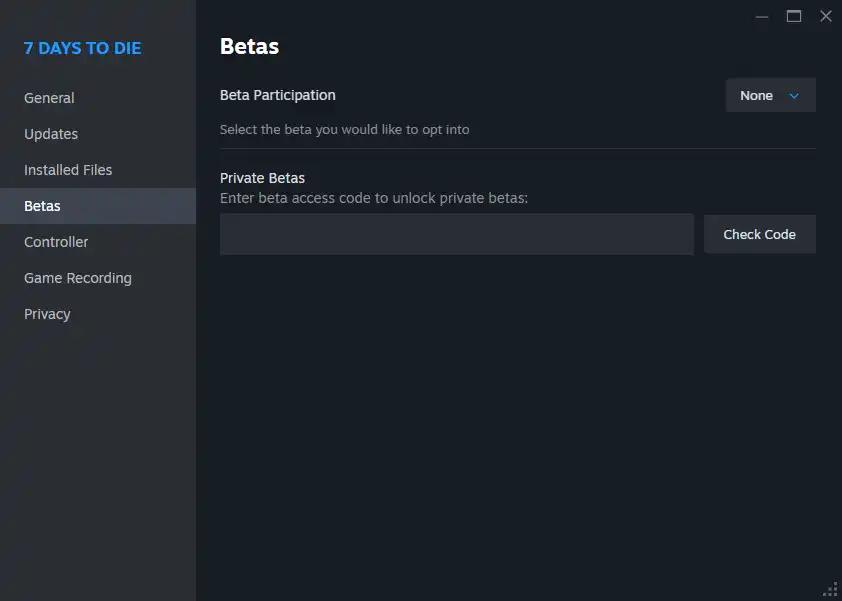
- 4. Select the Betas tab in the Properties window
- 5. Click the dropdown box next to Beta Participation, and choose the latest experimental version from the list
Crea il tuo server
7 Days to Die
7 Days to Die
Scegli un piano, seleziona un gioco e gioca con i tuoi amici!
Iscriviti alla nostra Newsletter
Iscriviti per ricevere gli ultimi aggiornamenti sul mondo del gaming!

Unisciti al nostro Discord
Entra a far parte della nostra community con oltre 20.000 membri appassionati come te!
Come valuteresti questo blog?
Condividi la tua opinione e aiutaci a migliorare sempre di più i nostri blog!
Non mi è piaciuto
Neutrale
Mi è piaciuto

Hai bisogno di un server di gioco?
Noleggia un server di gioco dove tu e i tuoi amici potrete giocare in privato con bassa latenza e impostazioni personalizzate. Scegli tra 110+ giochi, invita persone da tutto il mondo, goditi le partite private o costruisci la tua community online con le tue regole.

Blog Pertinenti







SCOPRI LE ULTIME NOVITÀ!
Iscriviti alla nostra newsletter per ricevere aggiornamenti sui nostri giochi ospitati, novità aziendali e offerte esclusive. Rimani sempre aggiornato!













