
Xbox Anniversary: How to Get the Minecraft Bedrock Edition OG Green Skin
Publié le par

Partager :

Partager sur X

Partager sur Facebook

Partager sur Threads

Partager sur Bluesky

Copier dans le presse-papiers

Partager par e-mail
Xbox is celebrating 25 years with free items across many of its games, including Minecraft! So, today, we explain step by step how to get the Minecraft OG Green Skin before it is gone forever.
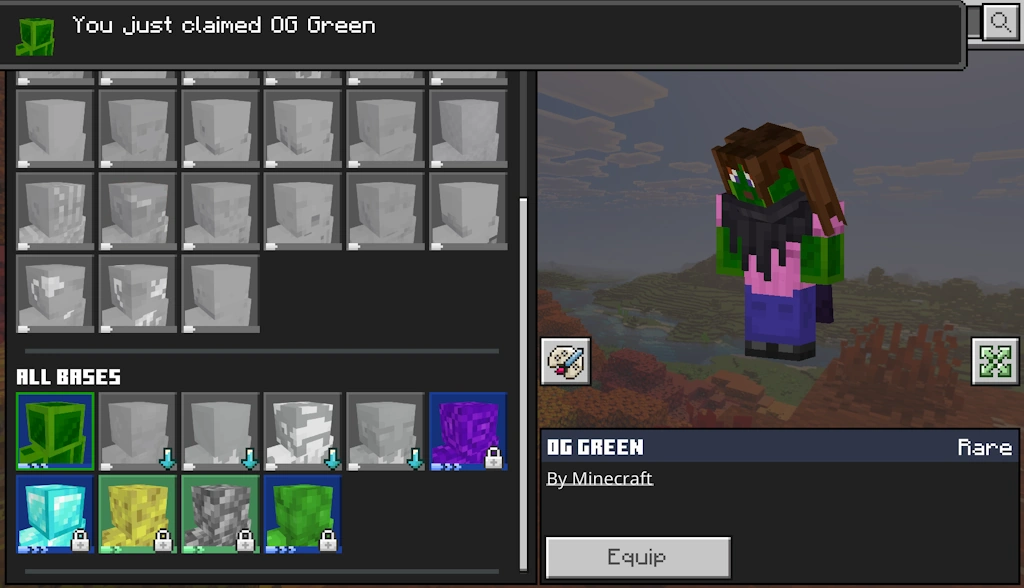 Available from November 10, 2026, at 10 AM PT to December 10, 2026, at 10 AM PT, the Minecraft OG Green Skin is a free full-body skin in the classic Xbox green color for Bedrock Edition players. To claim it, you need only a copy of Bedrock Edition and an internet connection.
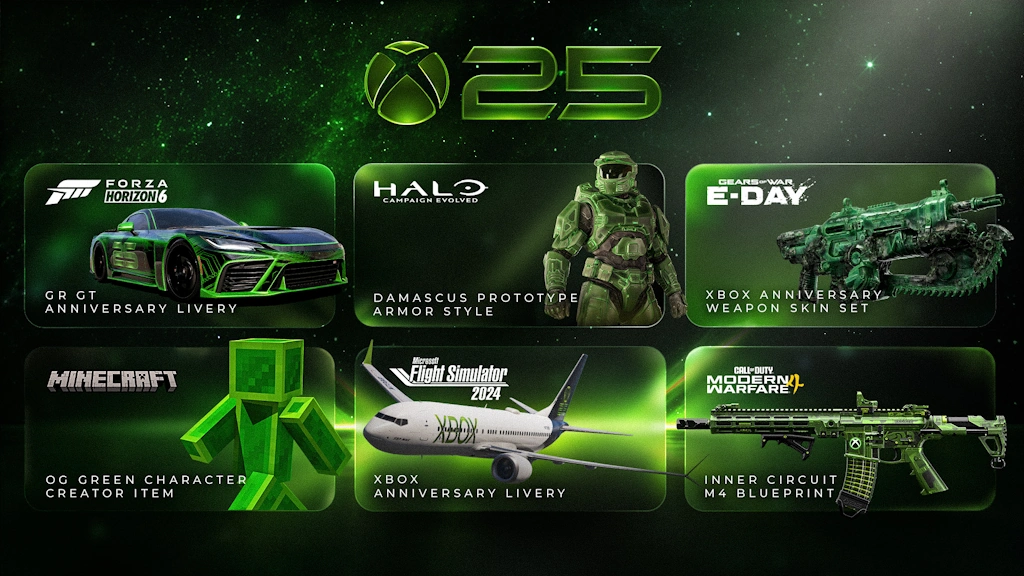 Alongside the OG Green Skin, Xbox players on console, PC, and mobile can claim the limited time Xbox 25th Anniversary badge for their profile. This reward only requires logging in for it to be automatically obtained. Other possible cosmetics include a weapons skin set for Gears of War E-Day, an anniversary GR GT livery for Forza Horizon 6, Halo Campaign Evolved prototype armor, Xbox livery for Flight Simulator 2024 planes, and an Xbox M4 skin in Call of Duty Modern Warfare 4. The dates and availability do, however, vary for each.
Finally, while it is not a cosmetic, Minecraft Bedrock Edition players can now take a look at their account statistics with Xbox Playback. It provides every detail from the first game on the account to the sometimes-frightening number of hours spent in each and every one, including Minecraft. If any of the numbers are too high, remember that “I forgot to close the game” is a valid excuse!
How to Get the Minecraft OG Green Skin
Available from November 10, 2026, at 10 AM PT to December 10, 2026, at 10 AM PT, the Minecraft OG Green Skin is a free full-body skin in the classic Xbox green color for Bedrock Edition players. To claim it, you need only a copy of Bedrock Edition and an internet connection.
- Launch Minecraft Bedrock Edition.
- Click or tap “Dressing Room”.
- Open the “Character Creator” tab.
- Expand the “Body” menu.
- Click or tap “Bases”.
- Under “All Bases” select OG Green.
- Click “Get”.
Other Xbox Anniversary Celebration Cosmetics
Alongside the OG Green Skin, Xbox players on console, PC, and mobile can claim the limited time Xbox 25th Anniversary badge for their profile. This reward only requires logging in for it to be automatically obtained. Other possible cosmetics include a weapons skin set for Gears of War E-Day, an anniversary GR GT livery for Forza Horizon 6, Halo Campaign Evolved prototype armor, Xbox livery for Flight Simulator 2024 planes, and an Xbox M4 skin in Call of Duty Modern Warfare 4. The dates and availability do, however, vary for each.
Finally, while it is not a cosmetic, Minecraft Bedrock Edition players can now take a look at their account statistics with Xbox Playback. It provides every detail from the first game on the account to the sometimes-frightening number of hours spent in each and every one, including Minecraft. If any of the numbers are too high, remember that “I forgot to close the game” is a valid excuse!Créez votre propre
serveur Minecraft
serveur Minecraft
Choisissez un plan, sélectionnez un jeu et jouez avec vos amis !
Abonnez-vous à notre newsletter
Abonnez-vous pour recevoir les dernières mises à jour sur l'univers du jeu vidéo !

Rejoignez notre Discord
Rejoignez notre communauté de plus de 20 000 membres passionnés !
Comment évalueriez-vous ce blog ?
Partagez votre avis et aidez-nous à améliorer nos blogs !
Pas aimé
Neutre
Aimé

Besoin d'un serveur de jeu ?
Louez un serveur de jeu où vous et vos amis pouvez jouer en privé avec une faible latence et des paramètres personnalisés. Choisissez parmi 110+ jeux, invitez des joueurs du monde entier et profitez de parties privées, ou créez votre propre communauté en ligne avec vos propres règles.

Blogs pertinents







OBTENEZ LES DERNIÈRES INFOS !
Inscrivez-vous à nos e-mails pour obtenir des mises à jour sur nos jeux hébergés, des nouvelles de l'entreprise et des offres exclusives. Restez au courant !













