

Risk of Rain 2 Controls Guide: PC, PlayStation, Xbox, & Nintendo Switch
Publié le par

Partager :

Partager sur X

Partager sur Facebook

Partager sur Threads

Partager sur Bluesky

Copier dans le presse-papiers

Partager par e-mail
Risk of Rain 2 focuses on efficient character movement to prevent an early death. One way to help prevent this tragedy is by understanding the game’s controls until muscle memory remembers which keybind is for a specific action. So, keep reading this Risk of Rain 2 Controls Guide to know the different default keybinds for the game’s various versions.
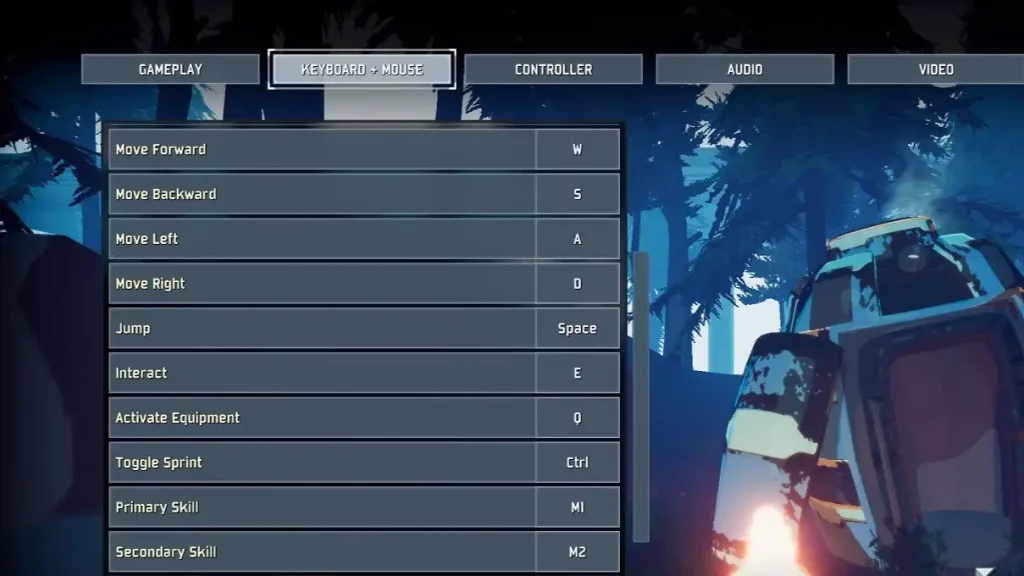 Note that all the controls for Risk of Rain 2 can be modified in the game's Settings menu. Nonetheless, here are the default in-game controls to know the keybinds and to learn how to move your chosen Survivor efficiently:
All Controls & Keybinds for Risk of Rain 2
Note that all the controls for Risk of Rain 2 can be modified in the game's Settings menu. Nonetheless, here are the default in-game controls to know the keybinds and to learn how to move your chosen Survivor efficiently:
PC (Keyboard & Mouse)
- Move Forward: W
- Move Backward: S
- Move Right: D
- Move Left: A
- Jump: Space
- Interact: E
- Info Screen: Tab
- Activate Equipment: Q
- Toggle Sprint: Ctrl
- Primary Skill: Left mouse button
- Secondary Skill: Right mouse button
- Utility Skill: Shift
- Special Skill: R
- Ping: Middle mouse button
PC (Controller)
- Basic Character Movement: Left analog stick
- Look Around: Right analog stick
- Jump: A
- Interact: X
- Info Screen: Menu
- Activate Equipment: Y
- Primary Skill: Right Trigger
- Secondary Skill: Left Trigger
- Utility Skill: Left Bumper
- Special Skill: Right Bumper
- Ping: Press right analog stick
PlayStation 4 & 5
- Basic Character Movement: Left analog stick
- Look Around: Right analog stick
- Jump: X
- Interact: Square
- Info Screen: Options
- Activate Equipment: Triangle
- Primary Skill: R2
- Secondary Skill: L2
- Utility Skill: L1
- Special Skill: R1
- Ping: R3
Xbox One, X, & S
- Basic Character Movement: Left analog stick
- Look Around: Right analog stick
- Jump: A
- Interact: X
- Info Screen: Menu
- Activate Equipment: Y
- Primary Skill: Right Trigger
- Secondary Skill: Left Trigger
- Utility Skill: Left Bumper
- Special Skill: Right Bumper
- Ping: Press right analog stick
Nintendo Switch
- Basic Character Movement: Left analog stick
- Look Around: Right analog stick
- Jump: B
- Interact: Y
- Info Screen: Start (+)
- Activate Equipment: X
- Primary Skill: ZR
- Secondary Skill: ZL
- Utility Skill: L
- Special Skill: R
- Ping: Press right analog stick
Créez votre propre
serveur Risk of Rain 2
serveur Risk of Rain 2
Choisissez un plan, sélectionnez un jeu et jouez avec vos amis !
Abonnez-vous à notre newsletter
Abonnez-vous pour recevoir les dernières mises à jour sur l'univers du jeu vidéo !

Rejoignez notre Discord
Rejoignez notre communauté de plus de 20 000 membres passionnés !
Comment évalueriez-vous ce blog ?
Partagez votre avis et aidez-nous à améliorer nos blogs !
Pas aimé
Neutre
Aimé

Besoin d'un serveur de jeu ?
Louez un serveur de jeu où vous et vos amis pouvez jouer en privé avec une faible latence et des paramètres personnalisés. Choisissez parmi 110+ jeux, invitez des joueurs du monde entier et profitez de parties privées, ou créez votre propre communauté en ligne avec vos propres règles.

Blogs pertinents







OBTENEZ LES DERNIÈRES INFOS !
Inscrivez-vous à nos e-mails pour obtenir des mises à jour sur nos jeux hébergés, des nouvelles de l'entreprise et des offres exclusives. Restez au courant !













