

New Minecraft Movie Capes: How to Earn & Redeem Online
Publié le par

Partager :

Partager sur X

Partager sur Facebook

Partager sur Threads

Partager sur Bluesky

Copier dans le presse-papiers

Partager par e-mail
The Minecraft movie is only a few weeks away, and to celebrate, Mojang has some new Minecraft movie capes available to earn today! So, come along as we explore step by step how to earn the Home and Menace capes before their codes expire, and they become legacy capes forever.
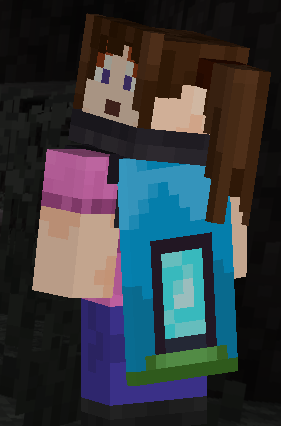 The first of the two new Minecraft Movie capes, titled “Home,” comes from a watch campaign on Twitch and can be obtained until April 6th at 5 PM EDT. To earn this cape, all one needs to do is watch three minutes of any participating Twitch Partner or Affiliate broadcasting in the Minecraft category on a registered Twitch account. The code will be sent automatically upon the campaign’s completion via a Twitch notification, and progress can be reviewed here.
Once the code is obtained, redeeming the cape is as easy as going to the webpage here, entering the code, and clicking “Redeem.” Just make sure you’re logged in to the correct account!
The first of the two new Minecraft Movie capes, titled “Home,” comes from a watch campaign on Twitch and can be obtained until April 6th at 5 PM EDT. To earn this cape, all one needs to do is watch three minutes of any participating Twitch Partner or Affiliate broadcasting in the Minecraft category on a registered Twitch account. The code will be sent automatically upon the campaign’s completion via a Twitch notification, and progress can be reviewed here.
Once the code is obtained, redeeming the cape is as easy as going to the webpage here, entering the code, and clicking “Redeem.” Just make sure you’re logged in to the correct account!
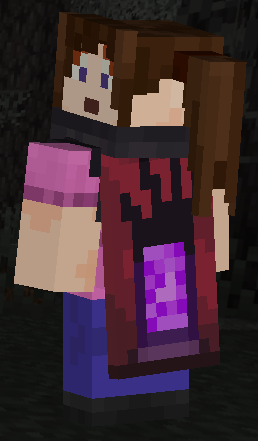 The second of the two new Minecraft Movie capes, titled “Menace,” comes from a watchtime quest on TikTok and can be obtained until April 6th at 5 PM EDT. Similar to the Twitch cape, all one needs to do is watch three minutes of a Minecraft creator’s TikTok live while logged into a registered TikTok account. However, there are a few niche stipulations. The code can only be earned through the IOS and Android apps, not the website, and your account and the TikTok Live being viewed must have rewards enabled. A notification should be sent upon the watchtime quest’s completion.
Once the code is obtained, redeeming the cape is once again as easy as going to the webpage here, entering the code, and clicking “Redeem.” Just make sure you’re logged in to the correct account!
The second of the two new Minecraft Movie capes, titled “Menace,” comes from a watchtime quest on TikTok and can be obtained until April 6th at 5 PM EDT. Similar to the Twitch cape, all one needs to do is watch three minutes of a Minecraft creator’s TikTok live while logged into a registered TikTok account. However, there are a few niche stipulations. The code can only be earned through the IOS and Android apps, not the website, and your account and the TikTok Live being viewed must have rewards enabled. A notification should be sent upon the watchtime quest’s completion.
Once the code is obtained, redeeming the cape is once again as easy as going to the webpage here, entering the code, and clicking “Redeem.” Just make sure you’re logged in to the correct account!
New Minecraft Movie Capes: How to Earn & Redeem Online
Home Cape
The first of the two new Minecraft Movie capes, titled “Home,” comes from a watch campaign on Twitch and can be obtained until April 6th at 5 PM EDT. To earn this cape, all one needs to do is watch three minutes of any participating Twitch Partner or Affiliate broadcasting in the Minecraft category on a registered Twitch account. The code will be sent automatically upon the campaign’s completion via a Twitch notification, and progress can be reviewed here.
Once the code is obtained, redeeming the cape is as easy as going to the webpage here, entering the code, and clicking “Redeem.” Just make sure you’re logged in to the correct account!
Menace Cape
The second of the two new Minecraft Movie capes, titled “Menace,” comes from a watchtime quest on TikTok and can be obtained until April 6th at 5 PM EDT. Similar to the Twitch cape, all one needs to do is watch three minutes of a Minecraft creator’s TikTok live while logged into a registered TikTok account. However, there are a few niche stipulations. The code can only be earned through the IOS and Android apps, not the website, and your account and the TikTok Live being viewed must have rewards enabled. A notification should be sent upon the watchtime quest’s completion.
Once the code is obtained, redeeming the cape is once again as easy as going to the webpage here, entering the code, and clicking “Redeem.” Just make sure you’re logged in to the correct account!
How to Change Capes
Java Edition
To change the cape you are wearing on Java Edition, simply open the official Minecraft website and follow the steps below.- Select “Account” in the top right corner and then “Login.”
- Click “All Games” on the left side of your Minecraft profile.
- Under “Minecraft: Java Edition,” select “Change Skin.”
- Scroll down to “Owned Capes.”
- Click your desired cape.
Bedrock Edition
To change the cape you are wearing on Bedrock Edition, simply open the Bedrock Edition client and follow the steps below.- Login to the Minecraft Bedrock Edition client.
- Select “Dressing Room.”
- Click the red cape icon on the left side of the screen.
- Pick your desired cape and select “Equipped.”
Créez votre propre
serveur Minecraft
serveur Minecraft
Choisissez un plan, sélectionnez un jeu et jouez avec vos amis !
Abonnez-vous à notre newsletter
Abonnez-vous pour recevoir les dernières mises à jour sur l'univers du jeu vidéo !

Rejoignez notre Discord
Rejoignez notre communauté de plus de 20 000 membres passionnés !
Comment évalueriez-vous ce blog ?
Partagez votre avis et aidez-nous à améliorer nos blogs !
Pas aimé
Neutre
Aimé

Besoin d'un serveur de jeu ?
Louez un serveur de jeu où vous et vos amis pouvez jouer en privé avec une faible latence et des paramètres personnalisés. Choisissez parmi 110+ jeux, invitez des joueurs du monde entier et profitez de parties privées, ou créez votre propre communauté en ligne avec vos propres règles.

Blogs pertinents







OBTENEZ LES DERNIÈRES INFOS !
Inscrivez-vous à nos e-mails pour obtenir des mises à jour sur nos jeux hébergés, des nouvelles de l'entreprise et des offres exclusives. Restez au courant !













