

Minecraft Shelves Guide: Powered Shelf Blocks, Storage Limits, & More
Publié le par

Partager :

Partager sur X

Partager sur Facebook

Partager sur Threads

Partager sur Bluesky

Copier dans le presse-papiers

Partager par e-mail
A new way to store items has arrived, and like item frames, everything within the block is visible at all times! So, today, we explore shelf blocks, and the secret features they hide, in our Minecraft shelves guide.
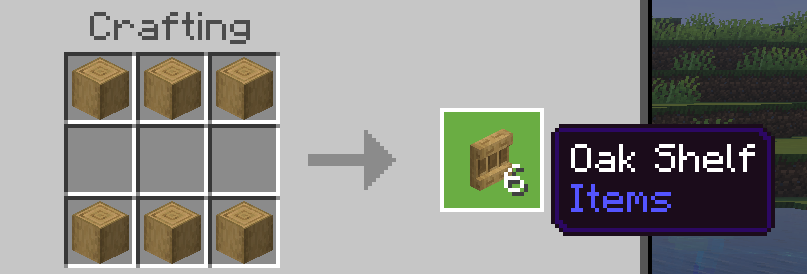 Shelf blocks have been added to all existing wood sets, including bamboo, crimson fungi, and warped fungi. To craft some of these nifty storage blocks of your very own, you need only gather six matching stripped logs and place them along the top and bottom row of a crafting table. This will produce six shelves, matching the stripped logs used to craft them.
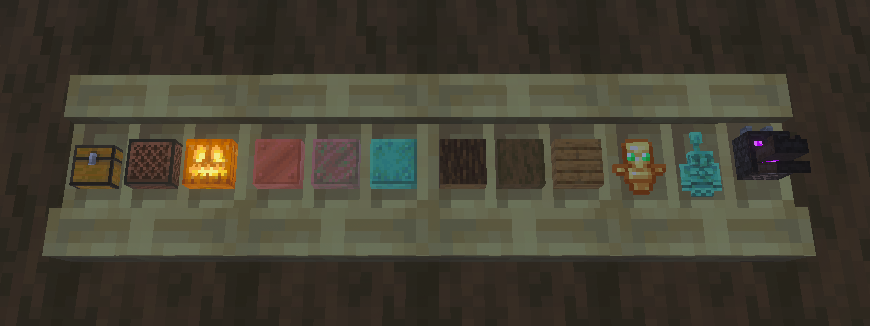 Each shelf block can store three items, with one stack of storage space for each. To store an item, simply right-click an open spot on the shelf. This will visibly store the item, much like an item frame. Right-clicking the item again will retrieve the entire stack.
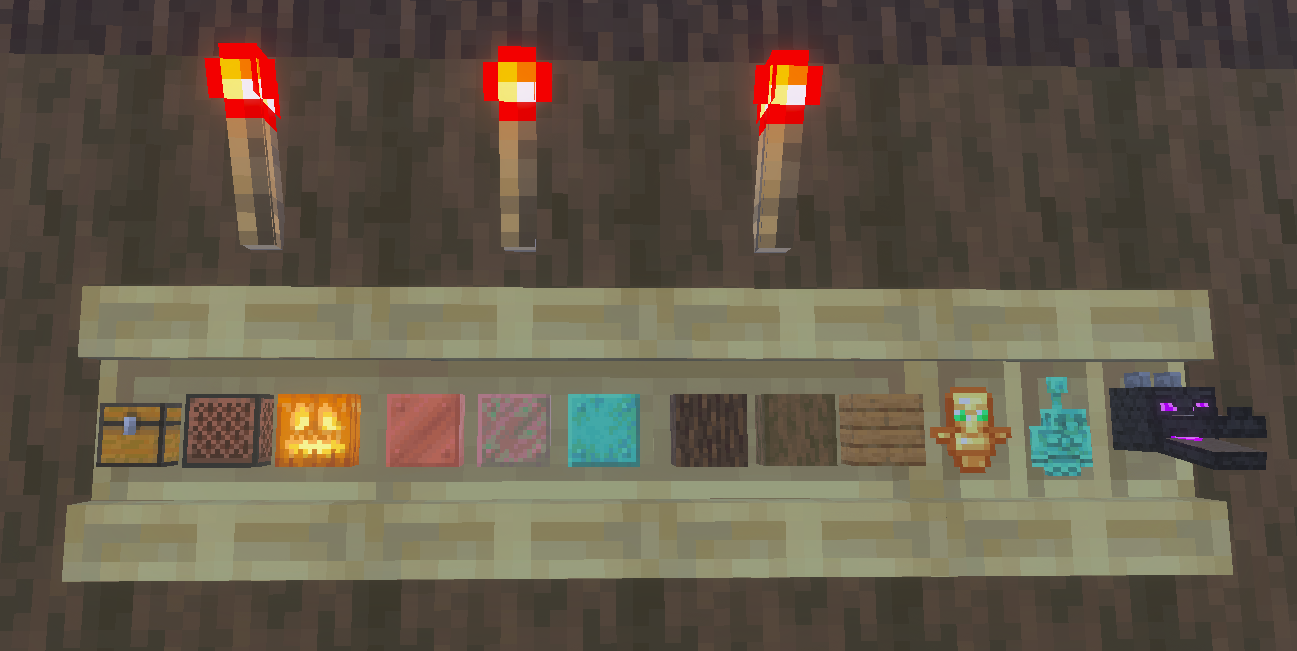 When a shelf block is powered by redstone of any kind, such as a redstone torch, it gains a new appearance alongside new features. Any player that right-clicks a powered shelf block will automatically swap the last three item slots on their hotbar with whatever is stored. This feature can be expanded further by connecting three powered shelf blocks, allowing players to swap their entire hotbar with the click of a button.
This effectively allows players to create loadouts that can be swapped with ease at any time. For example, three powered shelf blocks could be used to swap your mining hotbar on the way out of the mines for a building or combat oriented one. One could even create an armory where the most effective loadouts are available for each and every boss.
To tell if your Minecraft shelves are powered, check to see if the vertical lines that divide the stored items are still present. If they are, the shelves are not powered.
When a shelf block is powered by redstone of any kind, such as a redstone torch, it gains a new appearance alongside new features. Any player that right-clicks a powered shelf block will automatically swap the last three item slots on their hotbar with whatever is stored. This feature can be expanded further by connecting three powered shelf blocks, allowing players to swap their entire hotbar with the click of a button.
This effectively allows players to create loadouts that can be swapped with ease at any time. For example, three powered shelf blocks could be used to swap your mining hotbar on the way out of the mines for a building or combat oriented one. One could even create an armory where the most effective loadouts are available for each and every boss.
To tell if your Minecraft shelves are powered, check to see if the vertical lines that divide the stored items are still present. If they are, the shelves are not powered.
How to Craft Minecraft Shelves
Shelf blocks have been added to all existing wood sets, including bamboo, crimson fungi, and warped fungi. To craft some of these nifty storage blocks of your very own, you need only gather six matching stripped logs and place them along the top and bottom row of a crafting table. This will produce six shelves, matching the stripped logs used to craft them.
Unpowered Shelf Blocks
Each shelf block can store three items, with one stack of storage space for each. To store an item, simply right-click an open spot on the shelf. This will visibly store the item, much like an item frame. Right-clicking the item again will retrieve the entire stack.
Powered Shelf Blocks
When a shelf block is powered by redstone of any kind, such as a redstone torch, it gains a new appearance alongside new features. Any player that right-clicks a powered shelf block will automatically swap the last three item slots on their hotbar with whatever is stored. This feature can be expanded further by connecting three powered shelf blocks, allowing players to swap their entire hotbar with the click of a button.
This effectively allows players to create loadouts that can be swapped with ease at any time. For example, three powered shelf blocks could be used to swap your mining hotbar on the way out of the mines for a building or combat oriented one. One could even create an armory where the most effective loadouts are available for each and every boss.
To tell if your Minecraft shelves are powered, check to see if the vertical lines that divide the stored items are still present. If they are, the shelves are not powered.Créez votre propre
serveur Minecraft
serveur Minecraft
Choisissez un plan, sélectionnez un jeu et jouez avec vos amis !
Abonnez-vous à notre newsletter
Abonnez-vous pour recevoir les dernières mises à jour sur l'univers du jeu vidéo !

Rejoignez notre Discord
Rejoignez notre communauté de plus de 20 000 membres passionnés !
Comment évalueriez-vous ce blog ?
Partagez votre avis et aidez-nous à améliorer nos blogs !
Pas aimé
Neutre
Aimé

Besoin d'un serveur de jeu ?
Louez un serveur de jeu où vous et vos amis pouvez jouer en privé avec une faible latence et des paramètres personnalisés. Choisissez parmi 110+ jeux, invitez des joueurs du monde entier et profitez de parties privées, ou créez votre propre communauté en ligne avec vos propres règles.

Blogs pertinents







OBTENEZ LES DERNIÈRES INFOS !
Inscrivez-vous à nos e-mails pour obtenir des mises à jour sur nos jeux hébergés, des nouvelles de l'entreprise et des offres exclusives. Restez au courant !













