

How to Repair Items in Minecraft
Publié le par

Partager :

Partager sur X

Partager sur Facebook

Partager sur Threads

Partager sur Bluesky

Copier dans le presse-papiers

Partager par e-mail
A treasured item never needs to go away! A little love and care, and it is as good as the day it was made. So, today, we explain every Minecraft repair option in “How to Repair Items in Minecraft.”
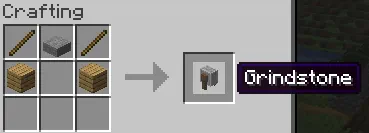 The first of the three options for repairing in Minecraft is exclusively for non-enchanted items. Simply put two identical tools, weapons, or pieces of armor into the crafting grid, and it will combine the durability. This can also be done within a grindstone, which removes enchantments, granting a little XP as well.
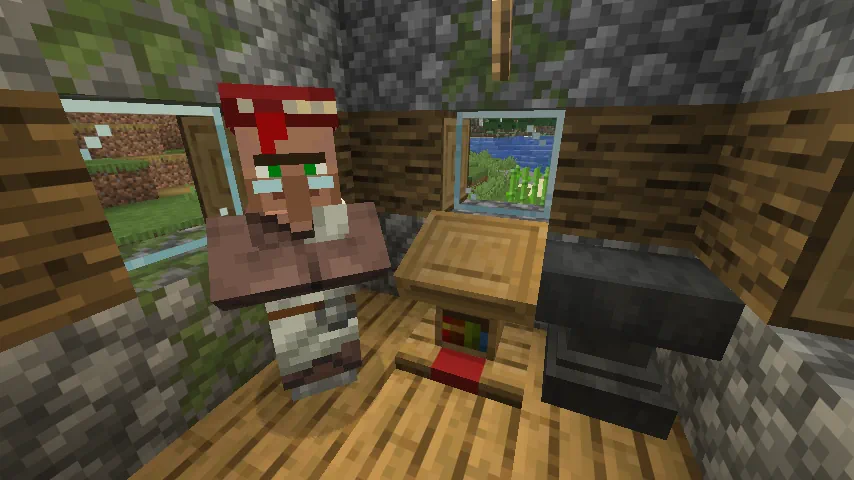 The next option for repairing items within Minecraft is the mending enchantment. Arguably the strongest in the game, it automatically consumes XP points to repair the tool, weapon, or armor it has been applied to, effectively making it last forever. This effect is intended to be balanced by having mending books be quite rare, but by repeatedly breaking and placing the lectern job block of a librarian villager, the trades can be reset until mending appears. The exact steps for this are as follows:
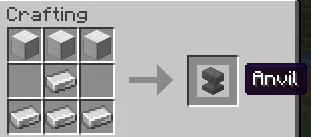 The final method for repairing in Minecraft is placing an item within an anvil alongside a second identical item. Unlike the first option, this allows enchanted items to be repaired or merged for an XP cost. However, every repair done in this way will gradually make the cost increase until it surpasses 50 levels. After that, the item can no longer be repaired as the anvil will state the level cost is too high.
How to Repair Items in Minecraft
Non-Enchanted Items
The first of the three options for repairing in Minecraft is exclusively for non-enchanted items. Simply put two identical tools, weapons, or pieces of armor into the crafting grid, and it will combine the durability. This can also be done within a grindstone, which removes enchantments, granting a little XP as well.
Mending Enchantment
The next option for repairing items within Minecraft is the mending enchantment. Arguably the strongest in the game, it automatically consumes XP points to repair the tool, weapon, or armor it has been applied to, effectively making it last forever. This effect is intended to be balanced by having mending books be quite rare, but by repeatedly breaking and placing the lectern job block of a librarian villager, the trades can be reset until mending appears. The exact steps for this are as follows:
- Block in a jobless villager.
- Place a lectern block.
- After the villager becomes a librarian, check its trades.
- If no mending trade is present, break the lectern job block.
- Repeat steps 1 through 4 until a mending trade appears.
Anvil Repairing
The final method for repairing in Minecraft is placing an item within an anvil alongside a second identical item. Unlike the first option, this allows enchanted items to be repaired or merged for an XP cost. However, every repair done in this way will gradually make the cost increase until it surpasses 50 levels. After that, the item can no longer be repaired as the anvil will state the level cost is too high.Créez votre propre
serveur Minecraft
serveur Minecraft
Choisissez un plan, sélectionnez un jeu et jouez avec vos amis !
Abonnez-vous à notre newsletter
Abonnez-vous pour recevoir les dernières mises à jour sur l'univers du jeu vidéo !

Rejoignez notre Discord
Rejoignez notre communauté de plus de 20 000 membres passionnés !
Comment évalueriez-vous ce blog ?
Partagez votre avis et aidez-nous à améliorer nos blogs !
Pas aimé
Neutre
Aimé

Besoin d'un serveur de jeu ?
Louez un serveur de jeu où vous et vos amis pouvez jouer en privé avec une faible latence et des paramètres personnalisés. Choisissez parmi 110+ jeux, invitez des joueurs du monde entier et profitez de parties privées, ou créez votre propre communauté en ligne avec vos propres règles.

Blogs pertinents







OBTENEZ LES DERNIÈRES INFOS !
Inscrivez-vous à nos e-mails pour obtenir des mises à jour sur nos jeux hébergés, des nouvelles de l'entreprise et des offres exclusives. Restez au courant !













