
Icarus Controls Guide (PC, Console)
Publié le par

Partager :

Partager sur X

Partager sur Facebook

Partager sur Threads

Partager sur Bluesky

Copier dans le presse-papiers

Partager par e-mail
The world of Icarus tests each player’s ability to survive, and mastering the game’s controls improves your chances of walking off a ferocious Grizzly Bear attack. Whether you’re commanding your character with a controller or a keyboard & mouse, the in-game controls can become your lifeline. So, start your journey to becoming a master Prospector by understanding the game’s controls through this guide.
 Consider this Icarus Controls Guide to be a control room schematic. Below are the default keybinds across the game’s PC and console editions. That said, feel free to rebind the control schemes to tailor them to your unique playstyle, especially for combat and crafting.
Note: The controls mentioned below are for the game’s PC and PS5 editions. Follow this page for updates on the game’s Xbox controls.
Consider this Icarus Controls Guide to be a control room schematic. Below are the default keybinds across the game’s PC and console editions. That said, feel free to rebind the control schemes to tailor them to your unique playstyle, especially for combat and crafting.
Note: The controls mentioned below are for the game’s PC and PS5 editions. Follow this page for updates on the game’s Xbox controls.
Icarus Controls for PC & Console Editions
Consider this Icarus Controls Guide to be a control room schematic. Below are the default keybinds across the game’s PC and console editions. That said, feel free to rebind the control schemes to tailor them to your unique playstyle, especially for combat and crafting.
Note: The controls mentioned below are for the game’s PC and PS5 editions. Follow this page for updates on the game’s Xbox controls.
Icarus PC Controls (Keyboard & Mouse)
Global Controls
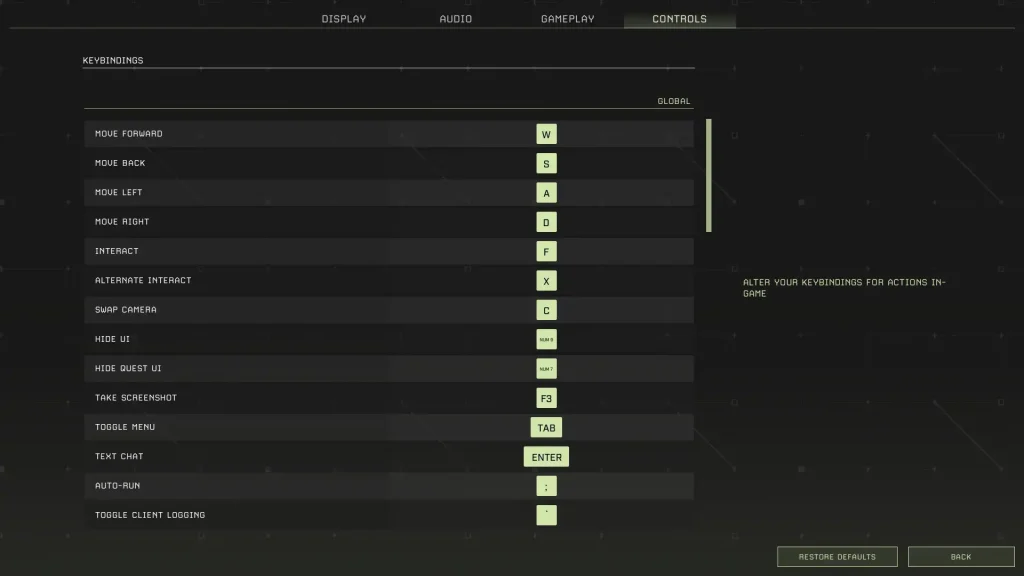
- Move Forward: W
- Move Back: S
- Move Left: A
- Move Right: D
- Interact: F
- Alternate Interact: X
- Swap Camera: C
- Hide UI: Numpad 9
- Hide Quest UI: Numpad 7
- Take Screenshot: F3
- Toggle Menu: Tab
- Text Chat: Enter
- Auto Run: Semicolon (;)
- Toggle Client Logging: Backtick (`)
- Open Field Guide: J
- Open Field Guide to Index: F1
- Loot All: Q
Player Controls (On Foot)
- Free Look: Left ALT
- Sprint: Left SHIFT
- Jump: Space
- Crouch: Left CTRL
- Hands: H
- Hotbar Forward: Mouse scroll wheel down
- Hotbar Back: Mouse scroll wheel up
- Hotbar 1: 1
- Hotbar 2: 2
- Hotbar 3: 3
- Hotbar 4: 4
- Hotbar 5: 5
- Hotbar 6: 6
- Hotbar 7: 7
- Hotbar 8: 8
- Hotbar 9: 9
- Hotbar 0: 0
- Hotbar Backpack: G
- Destroy Building Piece: Y
- Unfocus Building Grid: END
- Disable Building Grid Focus: HOME
- Raise Building Grid Offset: Page Up
- Lower Building Grid Offset: Page Down
- Toggle Suit Light: L
- Play Emote: Numpad +
- Toggle Photo Mode: Numpad 8
Weapons Controls
- Fire: Left mouse button
- Alternate Fire: Right mouse button
- Reload: R
In Prospect Controls
- Inventory: I
- Crafting: O
- Map: M
- Tech: P
Tamed Creatures Controls
- Toggle Stay/Follow: Slash (/)
- Cycle Combat Behavior: INSERT/DELETE
- Nearby Tamed Creatures Follow: Left Bracket ([)
- Nearby Tamed Creatures Stay: Right Bracket (])
Icarus PlayStation 5 Controls
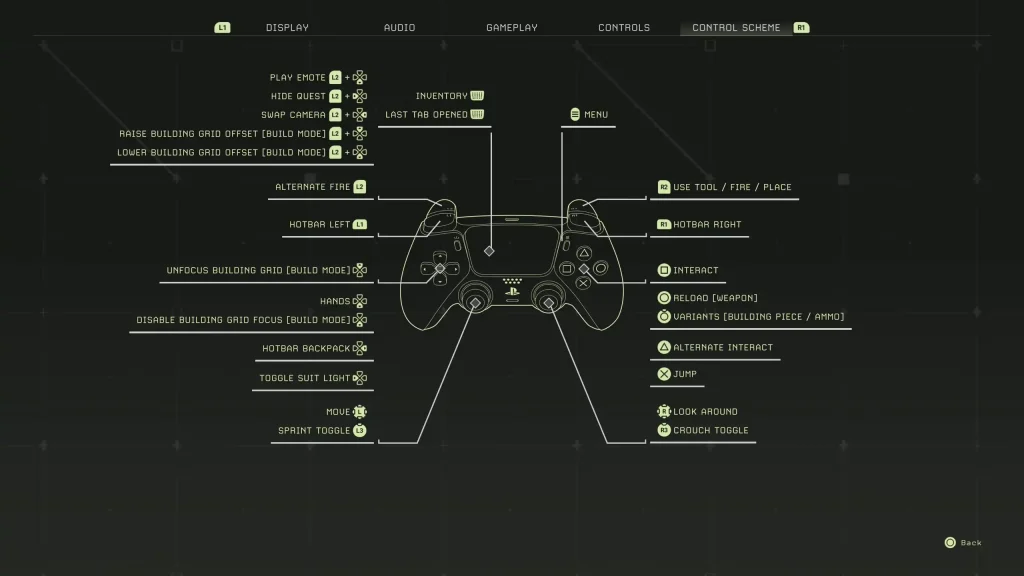
- Play Emote: L2 + Down directional button
- Hide Quest: L2 + Left directional button
- Swap Camera: L2 + Right directional button
- Raise Building Grid Offset (Build Mode): L2 + Up directional button
- Lower Building Grid Offset (Build Mode): L2 + Down directional button
- Alternate Fire: L2
- Hotbar Left: L1
- Unfocus Building Grid (Build Mode): Up directional button
- Hands: Down Directional Button
- Disable Building Grid Focus (Build Mode): Down directional button
- Hotbar Backpack: Right directional button
- Toggle Suit Light: Left directional button
- Basic Movement: Left analog stick
- Sprint Toggle: L3
- Inventory/Last Tab Opened: Press the touchpad
- Menu: Options button
- Use Tool/Fire/Place: R2
- Hotbar Right: R1
- Interact: Square
- Reload (Weapon): Circle
- Variants (Building Piece/Ammo): Hold Circle
- Alternate Interact: Triangle
- Jump: X
- Look Around: Right analog stick
- Crouch Toggle: R3
Créez votre propre
serveur Icarus
serveur Icarus
Choisissez un plan, sélectionnez un jeu et jouez avec vos amis !
Abonnez-vous à notre newsletter
Abonnez-vous pour recevoir les dernières mises à jour sur l'univers du jeu vidéo !

Rejoignez notre Discord
Rejoignez notre communauté de plus de 20 000 membres passionnés !
Comment évalueriez-vous ce blog ?
Partagez votre avis et aidez-nous à améliorer nos blogs !
Pas aimé
Neutre
Aimé

Besoin d'un serveur de jeu ?
Louez un serveur de jeu où vous et vos amis pouvez jouer en privé avec une faible latence et des paramètres personnalisés. Choisissez parmi 110+ jeux, invitez des joueurs du monde entier et profitez de parties privées, ou créez votre propre communauté en ligne avec vos propres règles.

Blogs pertinents







OBTENEZ LES DERNIÈRES INFOS !
Inscrivez-vous à nos e-mails pour obtenir des mises à jour sur nos jeux hébergés, des nouvelles de l'entreprise et des offres exclusives. Restez au courant !













