

How to Get the Minecraft TikTok Cape
Publié le par

Partager :

Partager sur X

Partager sur Facebook

Partager sur Threads

Partager sur Bluesky

Copier dans le presse-papiers

Partager par e-mail
(Estimated Read Time: 3 Minutes)
Minecraft’s 15th anniversary has arrived alongside more celebrations than ever before! So, today, we explore how to get the Minecraft TikTok cape as well as other secrets that Mojang has in store.Minecraft’s 15th Anniversary Celebration!
https://twitter.com/Minecraft/status/1790446035996639572In celebration of Minecraft’s 15th anniversary, Mojang will be releasing new cosmetics every day for the next 15 days, including the Minecraft TikTok cape, which we have provided the details for below. Each will have different requirements, and many will likely come from collaborations, with Twitch being a confirmed example of another one. Regardless of their source, all Minecraft 15th anniversary codes expire towards the end of June 2024, so make sure to get them before they are gone!
How to Get the Minecraft TikTok Cape
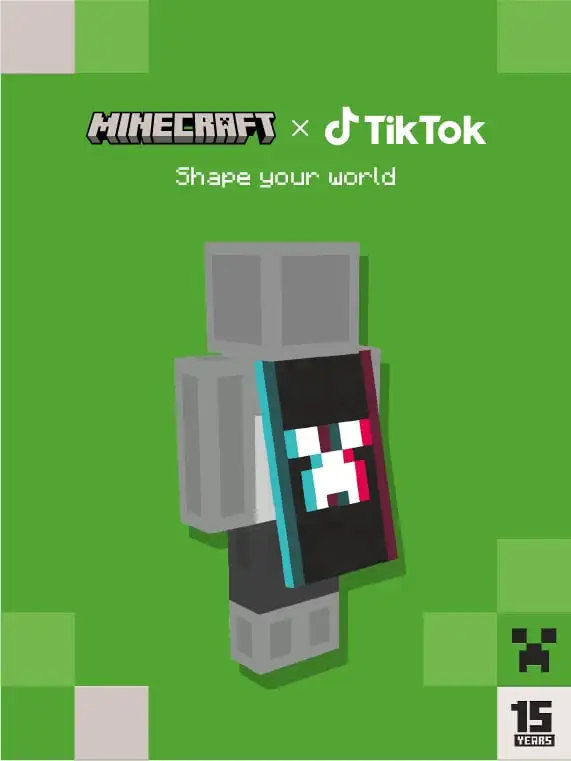 TikTok users will have a chance to earn an exclusive code drop while watching specific TikTok lives from May 18th to June 18th! At this time, it is unknown which specific TikTok lives will have the code available, but as soon as the information is shared, we will have them listed here.
Once a code is obtained, redeeming the new cape is as easy as going to the webpage here, entering the code, and clicking submit. Just make sure you’re in the right section and logged in!
Java Edition Minecraft TikTok Cape Availability is Confirmed. Codes Expire June 30, 2024.
TikTok users will have a chance to earn an exclusive code drop while watching specific TikTok lives from May 18th to June 18th! At this time, it is unknown which specific TikTok lives will have the code available, but as soon as the information is shared, we will have them listed here.
Once a code is obtained, redeeming the new cape is as easy as going to the webpage here, entering the code, and clicking submit. Just make sure you’re in the right section and logged in!
Java Edition Minecraft TikTok Cape Availability is Confirmed. Codes Expire June 30, 2024.
How to Change Capes: Java Edition
To check if you have any capes or to change the one you are wearing on Java Edition, simply open the official Minecraft website and follow the steps below.- Select “Account” in the top right corner and then “Login.”
- Click “My Games” on the left side of your Minecraft profile.
- Under “Minecraft: Java Edition,” select “Change Skin.”
- Scroll down to “Change Your Cape - PC/Mac.”
- Click your desired cape.
How to Change Capes: Bedrock Edition
To check if you have any capes or to change the one you are wearing on Bedrock Edition, simply open the Bedrock Edition client and follow the steps below.- Login to the Minecraft Bedrock Edition client.
- Select “Dressing Room.”
- Click the red cape icon on the left side of the screen.
- Pick your desired cape and select “Equipped.”
Créez votre propre
serveur Minecraft
serveur Minecraft
Choisissez un plan, sélectionnez un jeu et jouez avec vos amis !
Abonnez-vous à notre newsletter
Abonnez-vous pour recevoir les dernières mises à jour sur l'univers du jeu vidéo !

Rejoignez notre Discord
Rejoignez notre communauté de plus de 20 000 membres passionnés !
Comment évalueriez-vous ce blog ?
Partagez votre avis et aidez-nous à améliorer nos blogs !
Pas aimé
Neutre
Aimé

Besoin d'un serveur de jeu ?
Louez un serveur de jeu où vous et vos amis pouvez jouer en privé avec une faible latence et des paramètres personnalisés. Choisissez parmi 110+ jeux, invitez des joueurs du monde entier et profitez de parties privées, ou créez votre propre communauté en ligne avec vos propres règles.

Blogs pertinents







OBTENEZ LES DERNIÈRES INFOS !
Inscrivez-vous à nos e-mails pour obtenir des mises à jour sur nos jeux hébergés, des nouvelles de l'entreprise et des offres exclusives. Restez au courant !













