
Clone Hero: How to Add Songs
Publié le par

Partager :

Partager sur X

Partager sur Facebook

Partager sur Threads

Partager sur Bluesky

Copier dans le presse-papiers

Partager par e-mail
Unlock near-endless music adventures in Clone Hero by adding more tracks to the game’s library. Although adding custom songs is a rewarding experience, some players may have trouble completing this task successfully. So, here’s a guide on how to add songs in Clone Hero to help you expand your personal in-game playlist today.
 Note that Clone Hero is a freeware music rhythm game with a loyal and active community. With that, certain community members frequently add chart tracks for Clone Hero for other players to download and play.
With that, the first step to adding songs to Clone Hero is to download the files. Some notable portals are the following:
Custom Songs Central
Chorus Encore
RhythmVerse
Clone Hero Download Sheet Master List
Extract the files if they come in a .zip/.rar/.7z or similar format. Then, place the extracted files in the game’s Songs folder. Remember, the files must have an audio file, song.ini, and notes.chart/notes.mid. Normally, the Clone Hero's Songs folder should be under the main Documents folder on your Windows PC unless moved. If you’re playing Clone Hero in portable mode, ensure to place the songs and other files in the Songs folder in the PlayerData folder of the game’s location on your PC.
As for Mac users, the Songs folder should be in your system’s Home folder by default. In particular, navigate to the Clone Hero folder and open the Songs folder from there. Linux users can find the Songs folder in the ~/.clonehero folder.
Next, launch Clone Hero and navigate to the Settings menu from the main screen. Here, click the General tab, and then select “Scan Songs.” Confirm the action afterward, which may take a few seconds to a few minutes, depending on various factors.
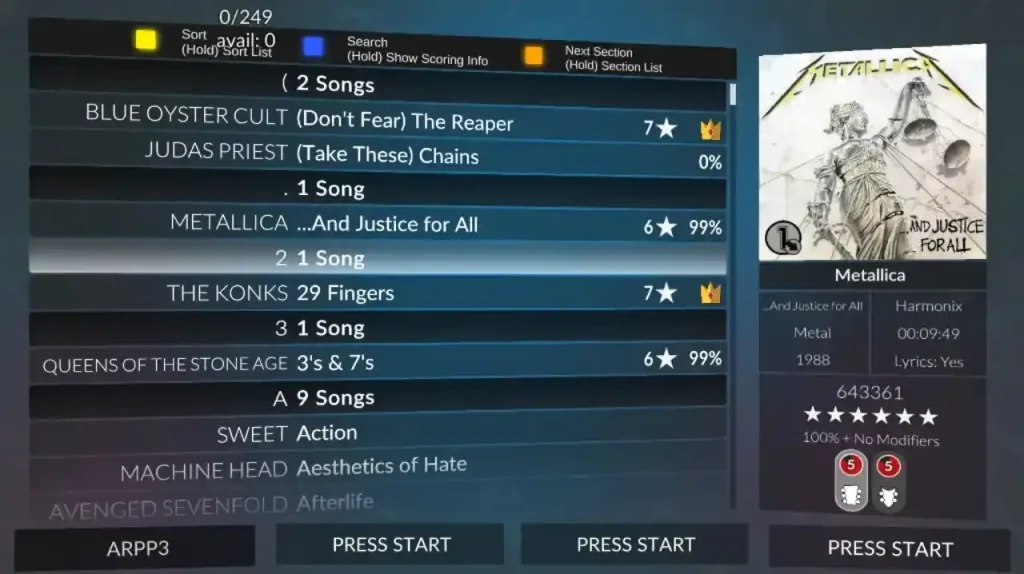
Finally, go back to the main screen and select “Quickplay.” If successful, you should see the newly added songs in the list. Now, all that’s left is to play the song and unleash your inner guitar maestro.
Note that Clone Hero is a freeware music rhythm game with a loyal and active community. With that, certain community members frequently add chart tracks for Clone Hero for other players to download and play.
With that, the first step to adding songs to Clone Hero is to download the files. Some notable portals are the following:
Custom Songs Central
Chorus Encore
RhythmVerse
Clone Hero Download Sheet Master List
Extract the files if they come in a .zip/.rar/.7z or similar format. Then, place the extracted files in the game’s Songs folder. Remember, the files must have an audio file, song.ini, and notes.chart/notes.mid. Normally, the Clone Hero's Songs folder should be under the main Documents folder on your Windows PC unless moved. If you’re playing Clone Hero in portable mode, ensure to place the songs and other files in the Songs folder in the PlayerData folder of the game’s location on your PC.
As for Mac users, the Songs folder should be in your system’s Home folder by default. In particular, navigate to the Clone Hero folder and open the Songs folder from there. Linux users can find the Songs folder in the ~/.clonehero folder.
Next, launch Clone Hero and navigate to the Settings menu from the main screen. Here, click the General tab, and then select “Scan Songs.” Confirm the action afterward, which may take a few seconds to a few minutes, depending on various factors.
Finally, go back to the main screen and select “Quickplay.” If successful, you should see the newly added songs in the list. Now, all that’s left is to play the song and unleash your inner guitar maestro.
How to Add Songs in Clone Hero
Note that Clone Hero is a freeware music rhythm game with a loyal and active community. With that, certain community members frequently add chart tracks for Clone Hero for other players to download and play.
With that, the first step to adding songs to Clone Hero is to download the files. Some notable portals are the following:
Custom Songs Central
Chorus Encore
RhythmVerse
Clone Hero Download Sheet Master List
Extract the files if they come in a .zip/.rar/.7z or similar format. Then, place the extracted files in the game’s Songs folder. Remember, the files must have an audio file, song.ini, and notes.chart/notes.mid. Normally, the Clone Hero's Songs folder should be under the main Documents folder on your Windows PC unless moved. If you’re playing Clone Hero in portable mode, ensure to place the songs and other files in the Songs folder in the PlayerData folder of the game’s location on your PC.
As for Mac users, the Songs folder should be in your system’s Home folder by default. In particular, navigate to the Clone Hero folder and open the Songs folder from there. Linux users can find the Songs folder in the ~/.clonehero folder.
Next, launch Clone Hero and navigate to the Settings menu from the main screen. Here, click the General tab, and then select “Scan Songs.” Confirm the action afterward, which may take a few seconds to a few minutes, depending on various factors.
Finally, go back to the main screen and select “Quickplay.” If successful, you should see the newly added songs in the list. Now, all that’s left is to play the song and unleash your inner guitar maestro.Créez votre propre
serveur Clone Hero
serveur Clone Hero
Choisissez un plan, sélectionnez un jeu et jouez avec vos amis !
Abonnez-vous à notre newsletter
Abonnez-vous pour recevoir les dernières mises à jour sur l'univers du jeu vidéo !

Rejoignez notre Discord
Rejoignez notre communauté de plus de 20 000 membres passionnés !
Comment évalueriez-vous ce blog ?
Partagez votre avis et aidez-nous à améliorer nos blogs !
Pas aimé
Neutre
Aimé

Besoin d'un serveur de jeu ?
Louez un serveur de jeu où vous et vos amis pouvez jouer en privé avec une faible latence et des paramètres personnalisés. Choisissez parmi 110+ jeux, invitez des joueurs du monde entier et profitez de parties privées, ou créez votre propre communauté en ligne avec vos propres règles.

Blogs pertinents







OBTENEZ LES DERNIÈRES INFOS !
Inscrivez-vous à nos e-mails pour obtenir des mises à jour sur nos jeux hébergés, des nouvelles de l'entreprise et des offres exclusives. Restez au courant !













