
Rust Ship Shape March Update: New Content, Patch Notes, & More
Publicado el por

Compartir:

Compartir en X

Compartir en Facebook

Compartir en Threads

Compartir en Bluesky

Copiar al portapapeles

Compartir por correo electrónico
Ahoy, Rust-y landlubbers! If you thought that the Rust Naval update was all we'd see in quarter one for 2026, you'd be wrong! Now that players can create the seaworthy vessels of their dreams, the developers at Facepunch Studios have started to refine and improve your new briney adventures. Take a look below to see the biggest updates you can look forward to in the Rust Ship Shape update.
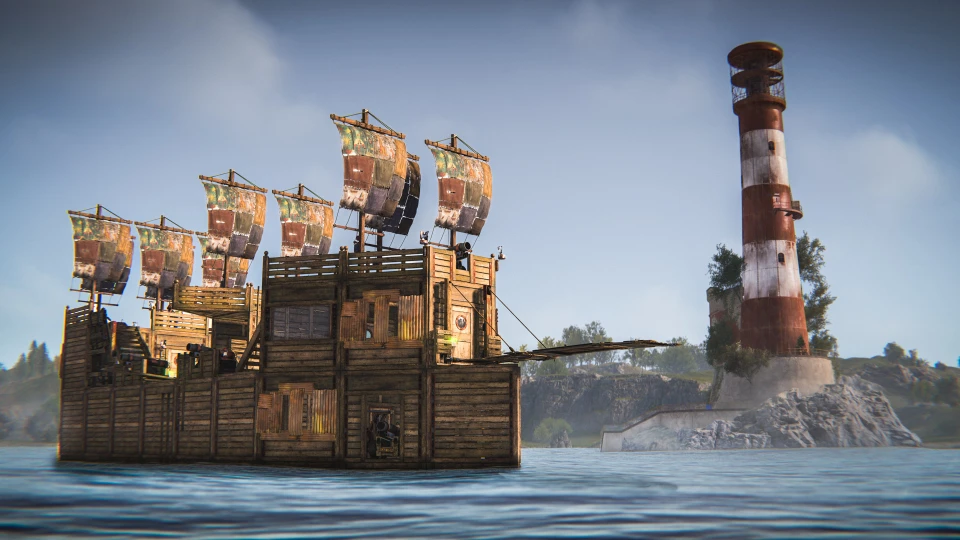 In case you weren't aware, the Rust Naval update released a heaping helping of free content. Most notable, of course, was the addition of player-made ships. These modular dinghies, schooners, and galleons can be constructed however you like. Whether built just for you or your crew, modular boats were coupled with the addition of a new Deep Sea area to give Rust even greater exploration and variety.
Now, however, the Ship Shape update is adding even more control over your maritime merriment. Electricity, Industrial, Water, and Wallpaper can now be added to player boats. This means you can give your boat a more personal touch. Wallpapers can help you stand out from the crowd, while Industrial and Water can keep you well-supplied while sailing. Finally, Electricity means you can get even more creative with both your ship's design and weaponry.
In addition to expanding modular ship capabilities, the Ship Shape update is also bringing the following:
In case you weren't aware, the Rust Naval update released a heaping helping of free content. Most notable, of course, was the addition of player-made ships. These modular dinghies, schooners, and galleons can be constructed however you like. Whether built just for you or your crew, modular boats were coupled with the addition of a new Deep Sea area to give Rust even greater exploration and variety.
Now, however, the Ship Shape update is adding even more control over your maritime merriment. Electricity, Industrial, Water, and Wallpaper can now be added to player boats. This means you can give your boat a more personal touch. Wallpapers can help you stand out from the crowd, while Industrial and Water can keep you well-supplied while sailing. Finally, Electricity means you can get even more creative with both your ship's design and weaponry.
In addition to expanding modular ship capabilities, the Ship Shape update is also bringing the following:
What's New in the Rust Ship Shape March Update?
In case you weren't aware, the Rust Naval update released a heaping helping of free content. Most notable, of course, was the addition of player-made ships. These modular dinghies, schooners, and galleons can be constructed however you like. Whether built just for you or your crew, modular boats were coupled with the addition of a new Deep Sea area to give Rust even greater exploration and variety.
Now, however, the Ship Shape update is adding even more control over your maritime merriment. Electricity, Industrial, Water, and Wallpaper can now be added to player boats. This means you can give your boat a more personal touch. Wallpapers can help you stand out from the crowd, while Industrial and Water can keep you well-supplied while sailing. Finally, Electricity means you can get even more creative with both your ship's design and weaponry.
In addition to expanding modular ship capabilities, the Ship Shape update is also bringing the following:
- Daytime/Nightime changes
- Each day now has a bit more daylight in it now.
- Deep Sea now opens on a random side at a random time.
- The Deep Sea area isn't always available. You and your hearty crew must be ready to weigh anchor and set sail to any corner of the map once it appears!
- Rigid-Hulled Inflatable Boats (RHIBs) can no longer enter the Deep Sea.
- If you want to brave the ocean blue, you'll need to create a modular boat of your own design.
- Static boat-building stations were added to the Deep Sea islands.
- Find yourself marooned in the Deep Sea? Gather whatever materials you can, and seek out one of these boat-building stations to craft yourself a boat ride back to the mainland.
Rust Ship Shape March Update: Full Patch Notes
Here is the full list of all patch notes included alongside the Rust Ship Shape update:Features
- Increased day time
- Electricity, industrial and water IO items deployable on boats
- Wallpaper on player boats
- Added boat building stations to Deep Sea Islands
- Added some aim sway when aiming weapons on moving boats
- Painting Line Tool
Improvements
- Improve deep sea spawning performance
- Improved water junkpile spawning performance
- Increased network range in the deep sea (300m to 640m)
- Deep sea is now closed when the server just wiped
- Improved wanted posters performance
- Improved toast messages performance
- Improved wallpaper performance
- Improved player boat drag-by-angle calculations
- Improved visuals when shooting cannons
- Cannons now provide some protection to the player
- If a player cannot spawn on the default spawn beach they will now spawn at a Fishing Village or Harbor
- Planter interact options are now always visible but disabled
- Improves sail placement guide, now goes yellow if the sail being placed will block another
- Improved performance of UsePlayerUpdateJobs 2 by fixing duplication of entity snapshots
- Improved performance of GamePhysics.TraceSpheres, GamePhysics.TraceSpheresUnordered, GamePhysics.VerifySpheres (scales better than serial counterparts around 32 queries)
- Sunken player boats are now destructible
- Cannon hits will now slow down boats
- Player boat decay delay increased. Decay duration decreased
- Player boat blocks can be rotated or demolished at any time in edit mode. Removed the timer
- Unified health display for player boats so the behaviour is more consistent across all the parts
- More feedback for "Deploy & Edit" option when it is unavailable due to location
- Improved clarity for icons of AND, OR and XOR IO switches
- Added particle controls to skin workshop, only BBQ currently supported
- Added animator controls to skin workshop, only BBQ currently supported
- Added painting menu rotation visualizer tool, with toggle to disable
- Reworked redundant painting reset rotation button to "flatten" rotation, preserving roll and panning only.
- Saving signs with "Hide Signs" option enabled will pop up a confirmation warning that you might be overwriting existing artwork
- Added ConVar for painting autosave timer configuration “client.autosavepaintinginterval <timer>”
- Added ConVar to support brush sizes greater than 100 “paint.maxbrushsize <number>"
- Optimised mission WorldPositionGenerator, in turn improving performance of UpdateMissionValidStateWorkQueue and talking to mission provider NPC's
- UpdateMissionValidStateWorkQueue now keeps a record of the last time it validated each mission to avoid revalidating missions if still in cooldown
- Exposed ServerVar's for 'missionValidStateWorkQueueCooldown' and 'missionPerValidStateCooldown' to customise how often the
- UpdateMissionValidStateWorkQueue should run tasks, tradeoff with accuracy of available mission map markers on clients
- Added ServerVar's 'resetmissions' and 'resetmissions_all' to reset missions progress for a target player or all players, leaving rest of playerstate intact
- Updated deploy animations for building planner and wallpaper tool
- Paintball overalls item icon now updates with the currently applied colour
- Server runtime_profiling gathers more stats from various job queues
Fixed
- Fixed UIDeepSeaPortalMarker NRE
- Fixed demo.browser command not working since the new main menu
- Fixed Swedish language not selectable in the option menu
- Restored the warning popup when logging off from a safe zone
- Fixed being able to deploy signs on door placed on boats
- Fixed demo recorder menu missing texts
- Fixed rugs and bear rugs placeable on cargo and harbour bridge
- Fixed game tip never showing
- Fixed bulb string light rotation issue when deployed on ceilings and floors
- Fixed deploy interaction not showing up on string lights sometimes
- Fixed auto turrets not targeting players when close to doors sometimes
- Fixed some performance issues when playing the video in the settings menu
- Fixed gibs missing textures for some skinned deployables
- Fixed boats becoming bricked when sleeping in storm conditions
- Fixed some player clipping issues with water junkpiles
- Fixed aim jitter when reloading and firing cannons at high ping
- Improved memory usage of tropical and tutorial islands, saves 130mb on client and servers
- Fixed an edge case that would prevent sleeping players from getting killed in safe zones after a server restart
- Fixed UI spacing issue when snapshotting a container with less than 5 items for sorting
- Skinned entities will now always despawn after the same amount of time as their base item when dropped
- Fixed not being able to mount the new AI on Oil Rigs to Trophies
- Fixed an entity leak when saving server state - persistent items are no longer saved if part of transient item container
- Fixed ~40 cases of server pool leaks
- Fixed bot IDs being incorrectly reused when loading a save
- Fixed TriggerParent volumes sometimes sleeping when it shouldn't
- Fixed a thread race condition in GamePhysics.SortDeferred
- Fixed perfsnapshot/_stream crashing if ran again while snapshot is being exported (now warns that it's busy)
- Worked around perfsnapshot/_stream failing to export due to system memory stats being corrupted (disabled mem stats gathering)
- Fixed C4 issues with Boat Building Stations
- Fixed getting stuck in the Boat Building Station umbrella
- Fixed player boats getting stuck on dive site buoys
- Fixed boat stairs having the incorrect protection properties
- Fixed deployables on upside down boats
- Fixed an issue where boat building stations could get locked in cooldown mode during a save
- Fixed Boat Building Station and player boats not having ownerid set correctly
- Fixed sails that have been rotated after placement sometimes getting destroyed
- Fixed the incorrect icon being shown for the "Rotate" sail option
- Fixed being able to briefly edit a sinking boat
- Fixed immortal entities showing health information
- Fixed Large Oil Rig vent openings causing projectile invalids
- Fixed Large Oil Rig confusing black barrel props to instead be yellow/red
- Fixed mannequins displaying the wrong paintball overalls colour
- Fixed a null reference exception which could occur when quickly swapping between paintball guns
- Paintball guns in turrets now deal extra damage to players wearing paintball overalls
- Paintball guns in turrets now retain their last applied colour
- Paintball impact effects now ignore max spawn distance if instigated by the local player (same as other impact effects)
- Server memory optimisations relating to projectiles
- UpdateMissionValidStateWorkQueue no longer validates tutorial missions
- Fixed mission map markers initially not being visible when first opening the map
- Fixed wolves not incrementing towards the Wildlife Cull mission
- Gone Killing mission now fails if the deep sea closes
- Fixed Beep in the Deep mission progress becoming stuck if player disconnects after finding but not opening the treasure chest
- Fixed Storage Monitor and Hopper draw distances being too far
- Fixed a multitude of items partially deployable in walls
- Fixed some missing currency symbol in the store
- Fixed owned items still showing up at the top of the limited and featured store when featured
- Fixed limited store countdown showing "Refreshed in 6 days" when the skins are late
- Fixed "Placing through walls" error popping up when you're placing doors sometimes, when you're clearly not placing them through walls
- Fixed BBQ and garage door gibs not being skinned
- Fixed performance issues with the video tooltips in the settings menu
Removed
- Removed obsolete Facepunch.Pool APIs (GetList, FreeList, FreeListAndItems, ClearList, FreeMemoryStream)
Known Issues
- MIDI support appears to be broken on Windows 11 24h2 and 25h2
Crea tu propio servidor
de Rust
de Rust
¡Elige un plan, escoge un juego y juega con tus amigos!
Suscríbete a nuestro boletín
¡Suscríbete para recibir las últimas actualizaciones sobre todo lo relacionado con los videojuegos!

Únete a nuestro Discord
¡Sé parte de nuestra comunidad de más de 20.000 miembros con ideas afines!
¿Cómo calificarías este blog?
¡Comparte tu opinión y ayúdanos a mejorar nuestros blogs!
No me gustó
Neutral
Me gustó

¿Necesitas un servidor de juegos?
Renta un servidor de juego donde tú y tus amigos puedan jugar en privado con baja latencia y configuraciones personalizadas. Elige entre 110+ juegos, invita a gente de todo el mundo y disfruta de partidas privadas, o construye tu propia comunidad en línea con tus propias reglas.

Blogs relevantes







¡ENTÉRATE DE TODO!
Únete a nuestro correo para recibir actualizaciones sobre nuestros juegos alojados, noticias de la empresa y ofertas exclusivas. ¡Mantente al día!













