

How to Repair Items in Minecraft
Publicado el por

Compartir:

Compartir en X

Compartir en Facebook

Compartir en Threads

Compartir en Bluesky

Copiar al portapapeles

Compartir por correo electrónico
A treasured item never needs to go away! A little love and care, and it is as good as the day it was made. So, today, we explain every Minecraft repair option in “How to Repair Items in Minecraft.”
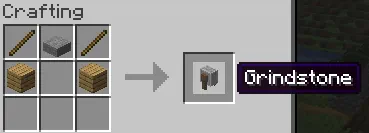 The first of the three options for repairing in Minecraft is exclusively for non-enchanted items. Simply put two identical tools, weapons, or pieces of armor into the crafting grid, and it will combine the durability. This can also be done within a grindstone, which removes enchantments, granting a little XP as well.
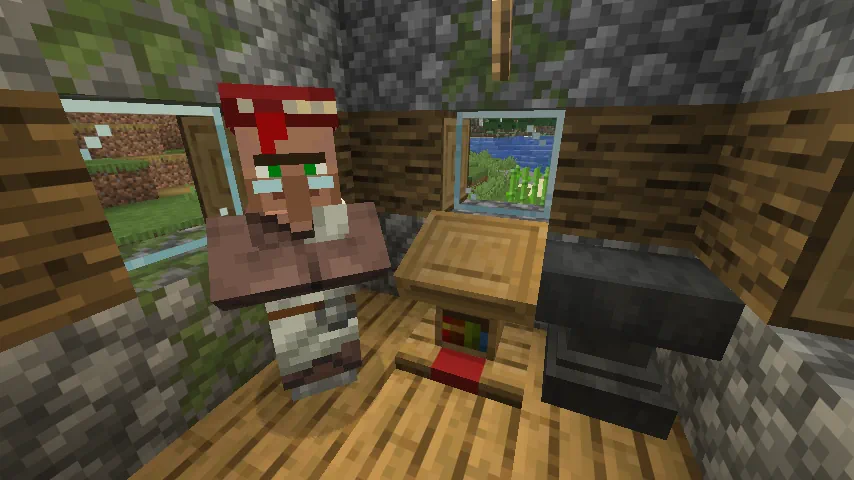 The next option for repairing items within Minecraft is the mending enchantment. Arguably the strongest in the game, it automatically consumes XP points to repair the tool, weapon, or armor it has been applied to, effectively making it last forever. This effect is intended to be balanced by having mending books be quite rare, but by repeatedly breaking and placing the lectern job block of a librarian villager, the trades can be reset until mending appears. The exact steps for this are as follows:
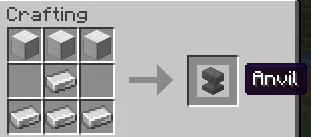 The final method for repairing in Minecraft is placing an item within an anvil alongside a second identical item. Unlike the first option, this allows enchanted items to be repaired or merged for an XP cost. However, every repair done in this way will gradually make the cost increase until it surpasses 50 levels. After that, the item can no longer be repaired as the anvil will state the level cost is too high.
How to Repair Items in Minecraft
Non-Enchanted Items
The first of the three options for repairing in Minecraft is exclusively for non-enchanted items. Simply put two identical tools, weapons, or pieces of armor into the crafting grid, and it will combine the durability. This can also be done within a grindstone, which removes enchantments, granting a little XP as well.
Mending Enchantment
The next option for repairing items within Minecraft is the mending enchantment. Arguably the strongest in the game, it automatically consumes XP points to repair the tool, weapon, or armor it has been applied to, effectively making it last forever. This effect is intended to be balanced by having mending books be quite rare, but by repeatedly breaking and placing the lectern job block of a librarian villager, the trades can be reset until mending appears. The exact steps for this are as follows:
- Block in a jobless villager.
- Place a lectern block.
- After the villager becomes a librarian, check its trades.
- If no mending trade is present, break the lectern job block.
- Repeat steps 1 through 4 until a mending trade appears.
Anvil Repairing
The final method for repairing in Minecraft is placing an item within an anvil alongside a second identical item. Unlike the first option, this allows enchanted items to be repaired or merged for an XP cost. However, every repair done in this way will gradually make the cost increase until it surpasses 50 levels. After that, the item can no longer be repaired as the anvil will state the level cost is too high.Crea tu propio servidor
de Minecraft
de Minecraft
¡Elige un plan, escoge un juego y juega con tus amigos!
Suscríbete a nuestro boletín
¡Suscríbete para recibir las últimas actualizaciones sobre todo lo relacionado con los videojuegos!

Únete a nuestro Discord
¡Sé parte de nuestra comunidad de más de 20.000 miembros con ideas afines!
¿Cómo calificarías este blog?
¡Comparte tu opinión y ayúdanos a mejorar nuestros blogs!
No me gustó
Neutral
Me gustó

¿Necesitas un servidor de juegos?
Renta un servidor de juego donde tú y tus amigos puedan jugar en privado con baja latencia y configuraciones personalizadas. Elige entre 110+ juegos, invita a gente de todo el mundo y disfruta de partidas privadas, o construye tu propia comunidad en línea con tus propias reglas.

Blogs relevantes







¡ENTÉRATE DE TODO!
Únete a nuestro correo para recibir actualizaciones sobre nuestros juegos alojados, noticias de la empresa y ofertas exclusivas. ¡Mantente al día!













