

Hytale Teleporter Guide: How to Build & Use Teleporters
Publicado el por

Compartir:

Compartir en X

Compartir en Facebook

Compartir en Threads

Compartir en Bluesky

Copiar al portapapeles

Compartir por correo electrónico
There's more than one way to zip around the world of Hytale. You can use a glider, you can (kind of) tromp around on mounts, and you can also use teleporters. Here we'll tell you everything you need to know about how to build and use teleporters in Hytale so you can spend more time adventuring than walking!
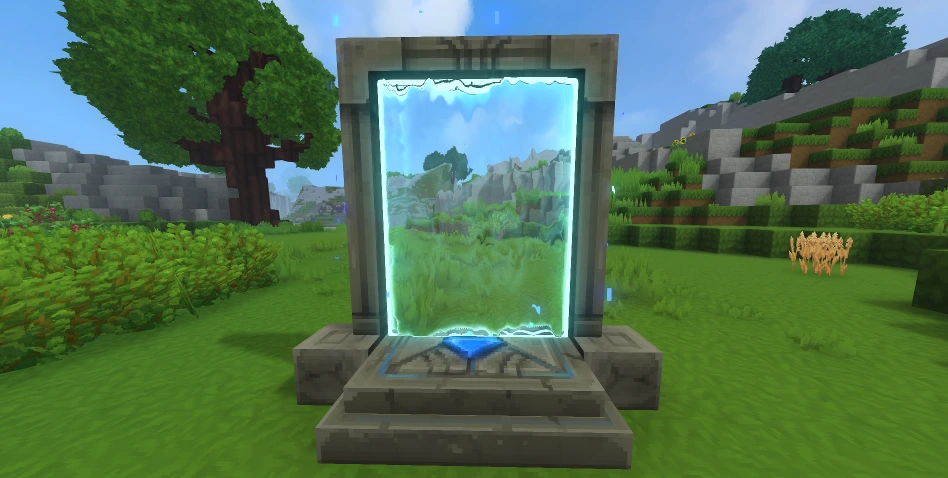 First things first: you need a teleporter before you can use a teleporter. Some of the materials you'll need are fairly rare. As a result, don't expect to hop in and start crafting teleporters right away. Before you can bend the fabric of space to your will, you'll need an Arcanist's Workbench.
First, you need to upgrade a standard Workbench to Tier 2 with the following:
First things first: you need a teleporter before you can use a teleporter. Some of the materials you'll need are fairly rare. As a result, don't expect to hop in and start crafting teleporters right away. Before you can bend the fabric of space to your will, you'll need an Arcanist's Workbench.
First, you need to upgrade a standard Workbench to Tier 2 with the following:
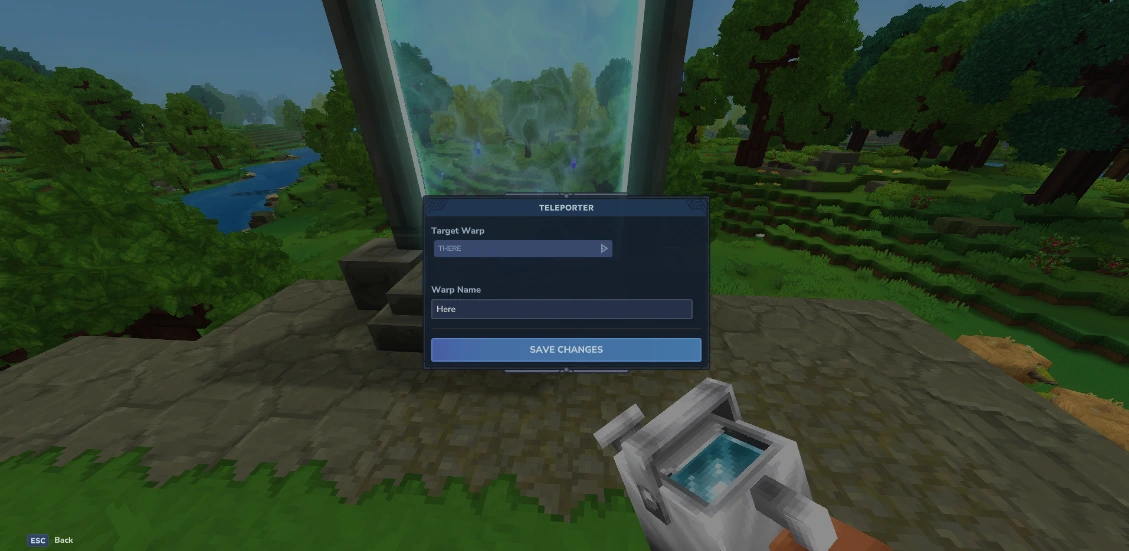 Once you've crafted your teleporter, you're still not ready to zip around. You need at least two teleporters planted in the world before you can use one. Once you have your teleporters planted, simply interact with them. Then, a small teleporter menu will open. Here you can set the name of the current teleporter you're using in the bar labeled "Warp Name," and you can choose the teleporter you'll travel to from the drop-down menu labeled "Target Warp."
Having a drop-down menu for only two teleporters might seem strange, but that's because you can place up to eight teleporters once you meet the right conditions. To earn the ability to place more teleporters, you need to gather memories using the Forgotten Temple.
This is how many memories you need to unlock more teleporters:
Once you've crafted your teleporter, you're still not ready to zip around. You need at least two teleporters planted in the world before you can use one. Once you have your teleporters planted, simply interact with them. Then, a small teleporter menu will open. Here you can set the name of the current teleporter you're using in the bar labeled "Warp Name," and you can choose the teleporter you'll travel to from the drop-down menu labeled "Target Warp."
Having a drop-down menu for only two teleporters might seem strange, but that's because you can place up to eight teleporters once you meet the right conditions. To earn the ability to place more teleporters, you need to gather memories using the Forgotten Temple.
This is how many memories you need to unlock more teleporters:
How to Build Hytale Teleporters
First things first: you need a teleporter before you can use a teleporter. Some of the materials you'll need are fairly rare. As a result, don't expect to hop in and start crafting teleporters right away. Before you can bend the fabric of space to your will, you'll need an Arcanist's Workbench.
First, you need to upgrade a standard Workbench to Tier 2 with the following:
- Copper Ingot: 30
- Iron Ingot: 20
- Linen Scraps: 20
- Thorium Ingot: 10
- Linen Scraps: 30
- Essence of Void: 20
- Azure Kelp: 2
- Azure Logs: 8
- Stone of Any Kind: 10
How to Use Hytale Teleporters
Once you've crafted your teleporter, you're still not ready to zip around. You need at least two teleporters planted in the world before you can use one. Once you have your teleporters planted, simply interact with them. Then, a small teleporter menu will open. Here you can set the name of the current teleporter you're using in the bar labeled "Warp Name," and you can choose the teleporter you'll travel to from the drop-down menu labeled "Target Warp."
Having a drop-down menu for only two teleporters might seem strange, but that's because you can place up to eight teleporters once you meet the right conditions. To earn the ability to place more teleporters, you need to gather memories using the Forgotten Temple.
This is how many memories you need to unlock more teleporters:
- 2 Teleporters: 0 Memories
- 3 Teleporters: 25 Memories
- 4 Teleporters: 50 Memories
- 6 Teleporters: 100 Memories
- 8 Teleporters: 200 Memories
Crea tu propio servidor
de Hytale
de Hytale
¡Elige un plan, escoge un juego y juega con tus amigos!
Suscríbete a nuestro boletín
¡Suscríbete para recibir las últimas actualizaciones sobre todo lo relacionado con los videojuegos!

Únete a nuestro Discord
¡Sé parte de nuestra comunidad de más de 20.000 miembros con ideas afines!
¿Cómo calificarías este blog?
¡Comparte tu opinión y ayúdanos a mejorar nuestros blogs!
No me gustó
Neutral
Me gustó

¿Necesitas un servidor de juegos?
Renta un servidor de juego donde tú y tus amigos puedan jugar en privado con baja latencia y configuraciones personalizadas. Elige entre 110+ juegos, invita a gente de todo el mundo y disfruta de partidas privadas, o construye tu propia comunidad en línea con tus propias reglas.

Blogs relevantes







¡ENTÉRATE DE TODO!
Únete a nuestro correo para recibir actualizaciones sobre nuestros juegos alojados, noticias de la empresa y ofertas exclusivas. ¡Mantente al día!













